How often should you upload to YouTube? Build a schedule you can finish
Calculate a realistic publishing cadence from production hours, review time and spare capacity. A worked example replaces the pressure to upload every day.

The quick answer
Choose an upload schedule your available hours can support while preserving the video's core quality. Estimate the full production cycle, leave room for delays and test the schedule against actual work. Publishing more frequently is not useful if it repeatedly produces unfinished or rushed videos.
In this guide
In this creator discussion, a long run of weekly uploads had become difficult to sustain. The creator was doing the work consistently, yet recent results made the workload feel harder to justify. That is a capacity question as much as a content question.
A calendar can make a production process visible. It cannot make twelve hours of work fit into six. Start by measuring the process you actually have.
Count the whole video
For the next upload, note time spent researching, preparing, recording, editing, packaging and checking the finished file. Include revisions and coordination. If you only count the edit, you will underestimate the schedule before the week begins.
Here is an illustrative solo-creator budget:
| Work | Hours |
|---|---|
| Research and outline | 2 |
| Setup and recording | 2 |
| Edit and graphics | 5 |
| Title, thumbnail and upload checks | 2 |
| Total | 11 |
If that creator has six reliable hours each week, two weeks provide twelve hours. An eleven-hour video technically fits but leaves only one hour for a failed recording, a missing graphic or a late correction. A three-week cycle provides more room, or the creator can reduce the scope enough to make two weeks dependable.
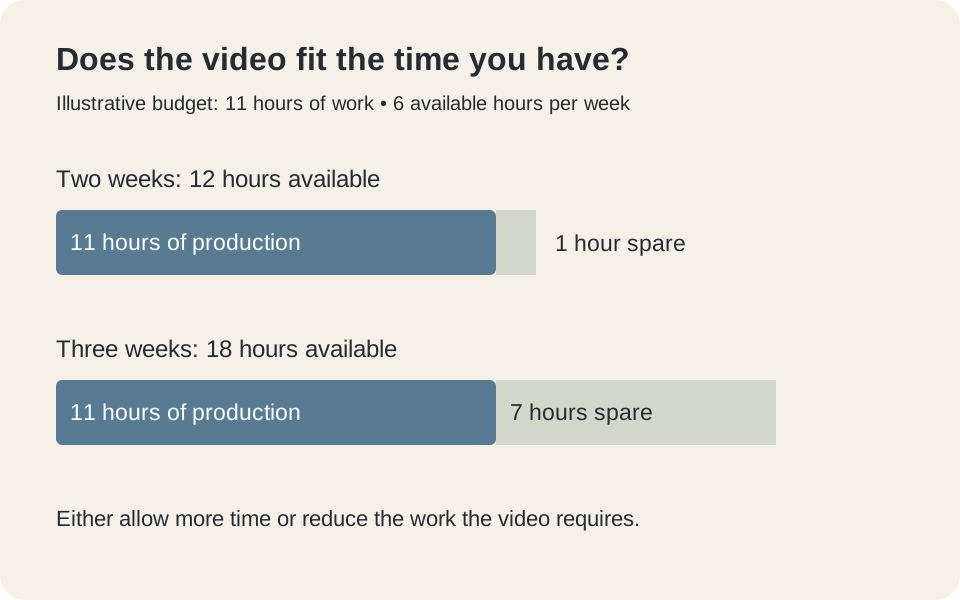 Illustrative production budget: eleven hours of work and six available hours per week.
These numbers are an example, not a recommended cadence. Your recording setup, video type and other responsibilities determine the useful calculation.
Reduce scope before removing the point of the video
A practical tutorial might need a clear demonstration, intelligible audio and a readable result. It may not need a custom animated introduction or three camera angles. Remove work that adds little to the viewer's understanding before cutting the explanation they came for.
Write two lists: “needed to deliver the promise” and “nice if time allows.” For a brake-repair tutorial, the exact tool size belongs in the first list. A cinematic shot of the workshop probably belongs in the second. For a visual essay, the priorities may be different.
Keep an explicit fallback: a smaller question you can answer completely when the larger project slips. A shorter complete video is different from publishing the unfinished middle of a larger one.
Do you have to publish weekly to keep growing?
YouTube's performance FAQ says its analyses have not found growth in views to correlate with time between uploads, and it does not require daily or weekly publishing. That does not mean scheduling is irrelevant to your audience or business. It means a fixed frequency is not a universal growth requirement.
Choose a cadence for reasons you can inspect: time to produce the work, audience expectations, topic timeliness and the learning you get from publishing. A news response and a detailed woodworking build have different constraints.
Avoid making a public promise you have not yet demonstrated you can keep. Work through several production cycles first, then decide whether an announced schedule helps viewers.
Review the schedule using production evidence
After each cycle, record planned hours, actual hours, the largest delay and what you would simplify next time. If editing repeatedly takes twice the estimate, change the estimate or the format. Do not carry the same impossible assumption into every week.
Also record whether the finished video delivered its promise. A schedule that produces more uploads while repeatedly skipping necessary demonstrations is not improving the viewer experience.
When one upload performs poorly, review its audience and execution separately from the calendar. A disappointing result does not prove that uploading a day earlier or later would have fixed it. Use a content calendar to reserve time for decisions and production, not just to display publication deadlines.
Common questions
Should I wait until the previous video stops getting views?
A view curve alone does not define a useful publishing date. Consider whether the next video is ready, whether it serves your audience and whether the timing matters for its topic. A slowdown after publishing another video does not establish causation.
How much spare production time should I reserve?
Base it on the delays you actually encounter. Start by recording overruns and building room for common problems. There is no universal buffer percentage that fits every format or creator.
Published by Vidfora, the product discussed in these guides. Examples are illustrative unless a source is named. Editorial approach · Suggest a correction